

 As penetration testers and red team operators, we often find ourselves conducting engagements from Linux-based operating systems. This preference is partly due to the compatibility of many offensive security tools with Linux-based environments. Whether you prefer Windows, Linux, or MacOS for your engagements, it would be convenient to perform all activities on one machine without the need to switch between operating systems using Visual Studio Projects.
If you're familiar with Microsoft’s Visual Studio, you understand the frustration of this scenario. Penetration testers often encounter this issue. A significant portion of proof-of-concept exploits and post-exploitation toolsets are developed as Visual Studio projects, structured with a .sln project solution file.
Migrating these projects to a Linux host isn't as straightforward as pulling the repository from GitHub and compiling. By default, Visual Studio C/C++ projects rely on the Microsoft Visual C++ (MSVC) compiler, which isn't directly compatible with Linux.
The immediate solutions typically involve:
-
- Starting a Windows VM to compile the binary and transferring it back to the Linux host.
- Porting the project to compile with a C/C++ compiler that is compatible with Linux and supports cross-compilation.
This blog will focus on how to achieve the former using Mingw-w64, a development environment for creating Windows applications on Linux.
Directory Structures
Visual Studio
Consider the HellsGate project, a C implementation of the Hell’s Gate technique for dynamically resolving system calls on a Windows machine. This proof-of-concept was created to invoke direct syscalls without relying on static elements, primarily as an evasion technique.
This blog post is not about evasion, so we will not discuss why or what this project is used for. However, the relevant information is that it's a Visual Studio project intended for compilation on Linux. Here is the file structure of the project:
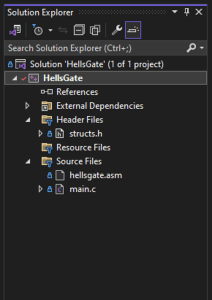 Figure 1 Visual Studio project structure
The project includes:
-
- Header file
- C source code file
- MASM assembly file
Since we aim to convert this project solution to compile it on a Linux host, we need to determine how and where the files should be structured.
Mingw-w64
Mingw-w64 is a fork of the original MinGW (Minimalist GNU for Windows) project, which aimed to provide a development toolchain for compiling native Windows applications using the GNU Compiler Collection (GCC). It has become the compiler of choice for many penetration testers and red teamers due to its ability to cross-compile Windows binaries on Linux.
Here is an example of how a basic Windows project could be structured for Mingw:
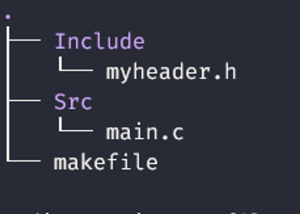
Figure 2 Mingw project structure
Using Mingw-w64, we can compile a project into an x86_64 Windows PE executable. Note that "-I" is used to include the directory ‘Include,’ which contains a custom header file.
x86_64-w64-mingw32-gcc Src/main.c -o main.exe -IInclude
MakeFile
As our project grows in complexity, such as needing to link external libraries and modify compiler optimizations, creating a Makefile becomes necessary. A Makefile is used by the make command to compile targeted builds. The file can be used to compile projects with almost any compiler for almost any operating system.
This implementation of a Makefile might not be the absolute best, but it keeps things simple and works for us. There are a few key components of our Makefile:
• Compiler selection
• Compiler flags
• Linker flags
• Custom variables
We can create a simple Makefile to compile our example executable using an organized approach.
CC = x86_64-w64-mingw32-gcc CFLAGS = -Wall all: main.exe main.exe: Src/main.c $(CC) -o $@ $^ $(CFLAGS) clean: rm -f main.exe
- CC is set to x86_64-w64-mingw32-gcc, which is the cross-compiler for Windows targeting x86_64 architecture
- CFLAGS can be adjusted to include any necessary compiler flags
- -Wall a compiler flag that enables warning messages
- all is the default target that builds your program. It depends on main.exe
- main.exe is the output file which will be a PE Windows executable x86_64
- -o $@ refers to the target of the rule, will get replaced with -o main.exe
- $^ refers to all prerequisites of the rule, will get replaced with Src/main.c
- clean is a target to remove the generated executable
Running make will trigger the default target (all) compilation process and build the executable defined.
Including Headers
But hold on... we have a custom header file. How do we include that in the compilation, as Visual Studio would 'just know' to do? Our custom header file, called 'myheader.h', may contain definitions we want to include in 'main.c', and the compilation will fail if the compiler isn’t aware of that file. It might look like this:
#ifndef MYHEADER_H #define MYHEADER_H // Include necessary headers #include <windows.h> #include <stdio.h> #endif /* MYHEADER_H */
Then typically our source code file would look like this, defining the #include directive for our header file.
#include "myheader.h" int main() { printf("Hello World!"); return 0; }
Now we run make to build our executable, but we get an error…
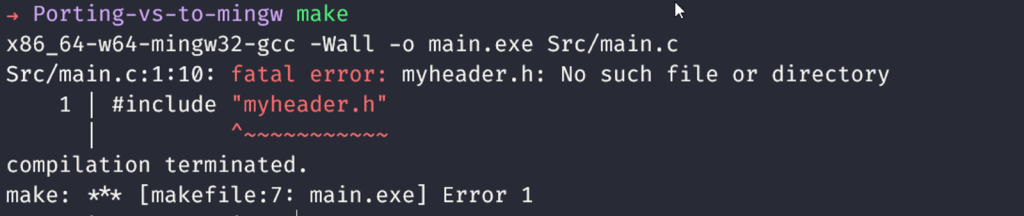
Figure 3 Compilation error
This is because we did not tell the compiler (mingw) about our directory that contains the custom header. So ultimately it could not find it. We need to adjust our makefile accordingly:
CC = x86_64-w64-mingw32-gcc CFLAGS = -Wall -IInclude all: main.exe main.exe: Src/main.c $(CC) -o $@ $^ $(CFLAGS) clean: rm -f main.exe
-I tells the compiler to add ‘Include’ to its list of directories to search for header files.
Now our executable successfully compiles!

Figure 4 PE compiles successfully
Linking External Libraries
Another situation that arises when porting Visual Studio projects to Mingw-w64 is the need to link external libraries. Mingw-w64 can link most libraries by detecting them via their #include directive, but it won’t be able to locate some. For example, if the project imports functions from wininet.dll, the build will fail:
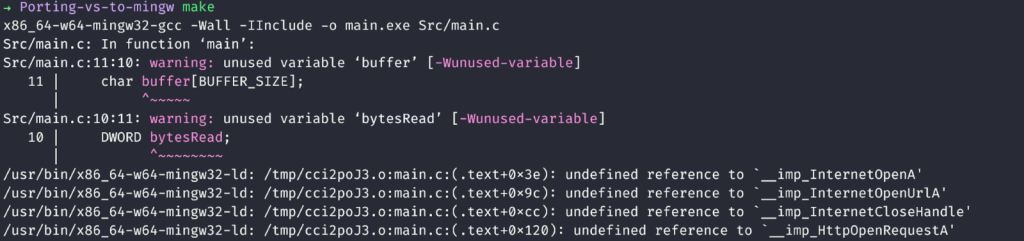
Figure 5 Undefined references in project
As you can see the linker x86_64-w64-mingw32-ld is complaining about undefined references to functions even though we’ve included the necessary directive (#include
C = x86_64-w64-mingw32-gcc CFLAGS = -Wall -IInclude LDFLAGS = -lwininet all: main.exe main.exe: Src/main.c $(CC) -o $@ $^ $(CFLAGS) $(LDFLAGS) clean: rm -f main.exe
- LDFLAGS holds our required linker flags
- -l instructs the linker to link against the specified library (wininet)
Now our program successfully compiles once again.
Optimizations
The last topic I'll cover is compiler optimization options. Visual Studio offers various options to customize how a program is compiled, which are useful for reducing file sizes, stripping symbols, removing debug data, and more. This can be accomplished using Mingw-w64 just as effectively. We can add a few options to our compiler flags:
CC = x86_64-w64-mingw32-gcc CFLAGS = -Wall -w -s -Os -IInclude LDFLAGS = -lwininet all: main.exe main.exe: Src/main.c $(CC) -o $@ $^ $(CFLAGS) $(LDFLAGS) clean: rm -f main.exe
- -w Disable all compiler warnings
- -s Strip symbols from the executable producing smaller files and make analysis harder
- -Os Optimize for size
Porting An Existing Project
If you're looking to compile an existing project like the HellsGate project using Mingw-w64, you'll need to adjust the project's file structure and add the necessary compiler flags.
Let’s use the HellsGate project we mentioned earlier. Here is the file structure of the Visual Studio project in a tree structure:
HellsGate ├── HellsGate │ ├── HellsGate.vcxproj │ ├── HellsGate.vcxproj.filters │ ├── hellsgate.asm │ ├── main.c │ └── structs.h ├── HellsGate.sln ├── README.md └── hells-gate.pdf 1 directory, 8 files
Let’s take the essential files and organize them into the project structure we’ve already established.
# Download the repository git clone <https://github.com/am0nsec/HellsGate.git> # Move all source code files recursively into the Src directory find HellsGate -type f \( -name "*.c" -o -name "*.cpp" -o -name "*.asm" \) -exec mv {} Src \; # Move all header files into the Include directory find HellsGate -type f -name "*.h" -exec mv {} Include \;
We’ve placed the source and header files into their respective folders. An important note to make is that the main source file for this project is a C file. Mingw-w64 has different compilers for C and C++. For C use x86_64-w64-mingw32-gcc , and for C++ you must use x86_64-w64-mingw32-g++. The project also contains an assembly file in Microsoft Macro Assembler syntax.
Assembly Source Files
The project contains an assembly that is formatted in Microsoft Macro Assembler (MASM) syntax intended to be built with Visual Studio on Windows. However, Mingw-w64 requires GNU Assembler (GAS), which supports the AT&T assembly syntax by default.
Unfortunately, I haven't found a way to compile MASM assembly syntax with Mingw-w64. Therefore, we'll need to convert the syntax of the instructions to GAS. While there are tools available for this conversion, I'll demonstrate how to do it manually using ChatGPT.
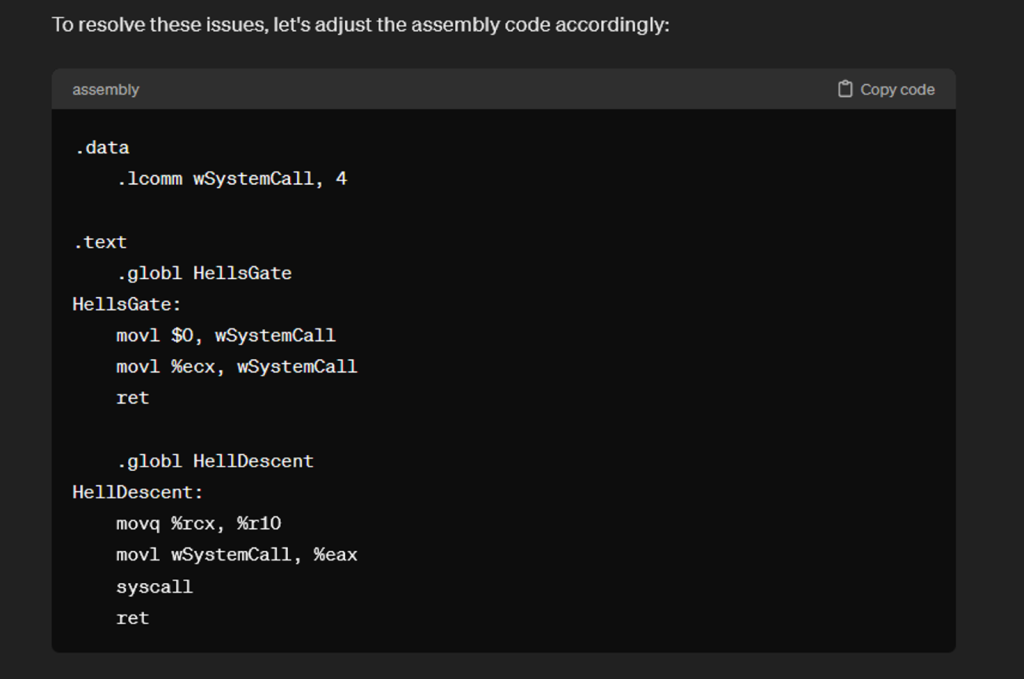
Figure 6 Using ChatGPT to convert assembly syntax
For Mingw-w64, assembly gets compiled using the x86_64-w64-mingw32-as utility. The resulting output file is an Intel COFF object file which can be included as a source file in the final compilation.
So let’s modify the template makefile we had above:
CC = x86_64-w64-mingw32-gcc AS = x86_64-w64-mingw32-as CFLAGS = -Wall -w -s -Os -IInclude all: HellsGate.exe HellsGate.exe: Src/main.c hellsgate.o $(CC) -o $@ $^ $(CFLAGS) hellsgate.o: Src/hellsgate.asm $(AS) -o $@ $< clean: rm -f HellsGate.exe hellsgate.o
- AS the assembly compiler
- $< refers to first prerequisite of the rule. This will get replaced with Src/hellsgate.asm
Troubleshooting
This will compile the assembly COFF object first then use it in the compilation of the final executable.
After trying to compile the project we run into our first hurdle.

Figure 7 Include case sensitive error
The reason for this error is simply that the specific Windows header file that Mingw-w64 searches for is case sensitive and must be lowercase. Changing #include
We compile again and we get an error undefined reference to WinMain'`

Figure 8 Character type error
This is because the compiler is using the ANSI or narrow character set, and the project’s code uses Unicode or wide character. We can tell Mingw-w64 to use Unicode with the compiler flag -municode.
CC = x86_64-w64-mingw32-gcc AS = x86_64-w64-mingw32-as CFLAGS = -Wall -w -s -Os -municode -IInclude all: HellsGate.exe HellsGate.exe: Src/main.c hellsgate.o $(CC) -o $@ $^ $(CFLAGS) hellsgate.o: Src/hellsgate.asm $(AS) -o $@ $&amp;amp;amp;amp;amp;amp;lt; clean: rm -f HellsGate.exe hellsgate.o
Run the make command, and there we go! We've successfully compiled a Windows PE executable using MinGW-w64, starting with a Visual Studio project.

Figure 9 Compile successfully
Dynamic Link Libraries
We can also easily compile a Dynamic Link Library (DLL) instead by changing one flag in our compiler options. Of course, you'll also need to make the necessary changes in your source code to ensure it functions as a DLL.
CC = x86_64-w64-mingw32-gcc AS = x86_64-w64-mingw32-as CFLAGS = -Wall -w -s -Os -municode -IInclude LDFLAGS = -shared all: HellsGate.exe HellsGate.dll HellsGate.exe: Src/main.c hellsgate.o $(CC) -o $@ $^ $(CFLAGS) # New DLL option includes the -shared flag HellsGate.dll: Src/main.c hellsgate.o $(CC) -o $@ $^ $(CFLAGS) $(LDFLAGS) hellsgate.o: Src/hellsgate.asm $(AS) -o $@ $&amp;amp;amp;amp;amp;amp;lt; clean: rm -f HellsGate.exe HellsGate.dll hellsgate.o
-shared tells the compiler to generate a DLL instead of EXE
Running make will now build both the executable and shared library versions.

Figure 10 Make all builds
Caveats
In certain situations, the target project may utilize code or features specific to Windows that MinGW-w64 may not directly support, one example being Structured Exception Handling (SEH). The Microsoft C/C++ compiler supports designated keywords (__try, __except) for SEH.
Unfortunately, MinGW-w64 does not support Microsoft’s SEH, and refactoring the source code to get the project to compile with MinGW-w64 may consume significant time. Sadly, in this situation, it may be easier to revert to traditional methods and boot up that Windows VM.
Interested in utilizing the expertise of our elite Offensive Security team? Contact us today and explore how we can enhance your security efforts.